




Budget management software gives you a plan. What it does not give you is control over what actually gets spent. For Australian CFOs and finance managers, that gap - between an approved budget and real-time spend visibility - is where budget integrity collapses.
This guide covers what budget management software actually does, why traditional budgeting tools fall short once money starts moving, what to look for when evaluating options for your Australia and New Zealand business, and how a closed-loop approach from budget to card spend to reconciliation produces the financial control that finance leaders actually need.
What budget management software actually does
Budget management software is a category of financial application that organises, tracks, and reports on a business's planned versus actual spend. At its core, it gives finance teams a structured way to allocate funds across departments, cost centres, or projects and to monitor performance against those allocations over time.
For small businesses, a budget planner might be a simple digital budget template with income and expense categories. For mid-market and enterprise businesses, budget management software typically includes multi-department structures, approval workflows for budget submissions, variance analysis, and integrations with accounting platforms like Xero, MYOB, or NetSuite.
In Australia and New Zealand, budget management sits within a specific regulatory context. Business budgeting must account for GST treatment across different spend categories - with some expenses GST-free and others subject to the 10% rate. Certain categories of budgeted spend, including entertainment and motor vehicle use, carry potential Fringe Benefits Tax (FBT) implications that affect how those budgets should be set and coded. The ATO's guidance on GST for business and FBT obligations apply directly to how your team codes and reconciles expense categories. Budget management software that does not account for this regulatory layer adds reconciliation risk at month-end.
There is also a distinction that matters enormously for ANZ finance teams and that most generic software comparisons overlook: the difference between a budgeting application and a spend management platform. The former plans. The latter controls. Both are real categories. Very few tools do both.
Why spreadsheets fail as budget management tools
Most Australian businesses start with a budgeting spreadsheet. ASIC's MoneySmart budget tools, a shared Google Sheet, or an Excel budget template - these are functional starting points, but they share a fundamental structural problem: they are always behind.
A budget spreadsheet records what has already happened. Someone exports a report from Xero or MYOB, pastes it into a spreadsheet, and compares actuals to budget. By the time that comparison happens, the spend has already occurred, often without any real-time signal that a team was approaching or exceeding its allocation.
The specific failure modes of spreadsheet budgeting in a business context are predictable:
No live spend data
A budgeting spreadsheet is a snapshot, not a dashboard. The gap between spend occurring and that spend appearing in the budget file is measured in days or weeks, not seconds.
No enforcement
A budgeting spreadsheet shows you what happened. It does not prevent out-of-budget spend from happening in the first place. Once a card is swiped or an invoice approved, the spreadsheet has no mechanism to flag or block it.
No coding at the point of spend
GST categorisation, cost centre allocation, and project coding all happen after the fact in a manual reconciliation process. Errors compound. Month-end becomes a correction exercise, not a close.
No audit trail
Spreadsheet edits are not versioned or permissioned in a finance-grade way. Regulatory and board-level scrutiny requires an immutable audit record of who approved what and when.
No scalability
A budget template that works for a 20-person business breaks at 80. Version control, multi-user editing conflicts, and formula integrity all deteriorate as team size and transaction volume grow.
The ASIC MoneySmart budget planner is an excellent tool for personal household budgeting. It is not built for business budget management at scale. The gap between a free budget planner designed for individuals and a proper business budgeting application is significant, and choosing the wrong category of tool is the most common error finance teams make when they outgrow their first spreadsheet.
Budgeting tools versus spend control tools: a critical distinction
This is the distinction that most budget management software comparisons miss, and it is the one that matters most for CFOs running Australian and New Zealand businesses.
Budgeting tools - including planning modules in Xero, MYOB's budget feature, or standalone FP&A applications - are planning instruments. They capture your intent: this department gets $50,000 for the quarter. They compare actuals to that intent once spending data flows in from your accounting system. They are retrospective by design. The reporting is always downstream of the spend.
Spend control tools - including corporate card platforms with real-time budget tracking, approval workflow systems, and pre-approved spend limits - operate at the point of spend. They enforce policy before money leaves the business. A card transaction over an approved category limit gets flagged or declined in real time. An expense submitted outside policy routes automatically for approval before it progresses. The control is prospective, not retrospective.
Most businesses need both. The planning function and the control function serve different purposes, and neither replaces the other. But the critical insight for ANZ finance leaders is this: a budget plan without spend control is a document, not a system. The moment your team starts spending against that budget, the plan loses fidelity unless real-time controls are enforcing it.
Expense tracking is not the same as expense control. Knowing where money went after it was spent is categorically different from ensuring money only gets spent where and how it was approved. Budget management software that only does the former leaves a material gap in financial governance.
What to look for in budget management software for Australian businesses
When evaluating budget management software for an Australian or New Zealand business, these are the capabilities that determine whether the tool actually closes the loop or just reports on what happened.
Xero, MYOB, and NetSuite integration
Your budget management tool must integrate directly with your accounting system. In Australia and New Zealand, the dominant platforms are Xero, MYOB, and for larger organisations, NetSuite. An integration that requires manual CSV exports and imports is not an integration - it is a bottleneck that reintroduces the lag problem spreadsheets create.
A genuine integration means spend data flows from the budget management layer into your accounting system automatically, with GST coding, cost centre allocation, and category mapping preserved. Reconciliation becomes a check, not a rebuild.
Real-time spend visibility by department or cost centre
Budget management software that only shows you total spend against total budget is insufficient for most businesses operating with multiple departments, projects, or locations. Your finance team needs to see spend against allocation at the department level, updated in real time, with drill-down to individual transactions.
This is the capability that transforms a budget planner into a management tool. Without it, the CFO's dashboard shows a number that is always stale, and department managers have no real-time signal when their team approaches the limit.
Approval workflows tied to budget limits
Pre-spend approval is the mechanism that makes budgets enforceable rather than advisory. Budget management software that routes spend requests through an approval workflow before money is committed gives finance teams prospective control. Approvals can be configured by amount, category, cost centre, or a combination - and every approval decision creates an auditable record.
This is particularly important for Australian businesses where ATO audit requirements, board reporting, and grant compliance obligations all require documented evidence of spend authorisation.
GST coding and ATO compliance support
Every expense category in your budget carries a GST treatment. Some expenses are fully GST-creditable, others are partially creditable, and some - including entertainment over defined thresholds and certain FBT-liable categories - require specific handling. Budget management software that codes GST at the point of spend, rather than leaving it to manual reconciliation, reduces ATO compliance risk and month-end correction time materially.
FBT-liable spend categories, including car allowances, entertainment, and some professional development expenditure, need to be flagged and tracked separately. A business budgeting tool that does not surface this distinction creates hidden reconciliation work and potential ATO exposure.
A budget app that works for your whole team
Budget management is not just a finance function. Department managers need visibility into their own allocations. People making spend decisions need to know where their team stands before committing to a purchase. The best budget management software gives every relevant person in the business a real-time view of their budget position, without requiring finance to run and distribute reports manually.
Budgeting apps and budget calculators designed for finance teams alone create an information asymmetry that produces out-of-budget spend. When the person with the card does not know the department is at 90% of its monthly allocation, they spend anyway - because no one told them not to.
How Australian finance teams use Weel for closed-loop budget management
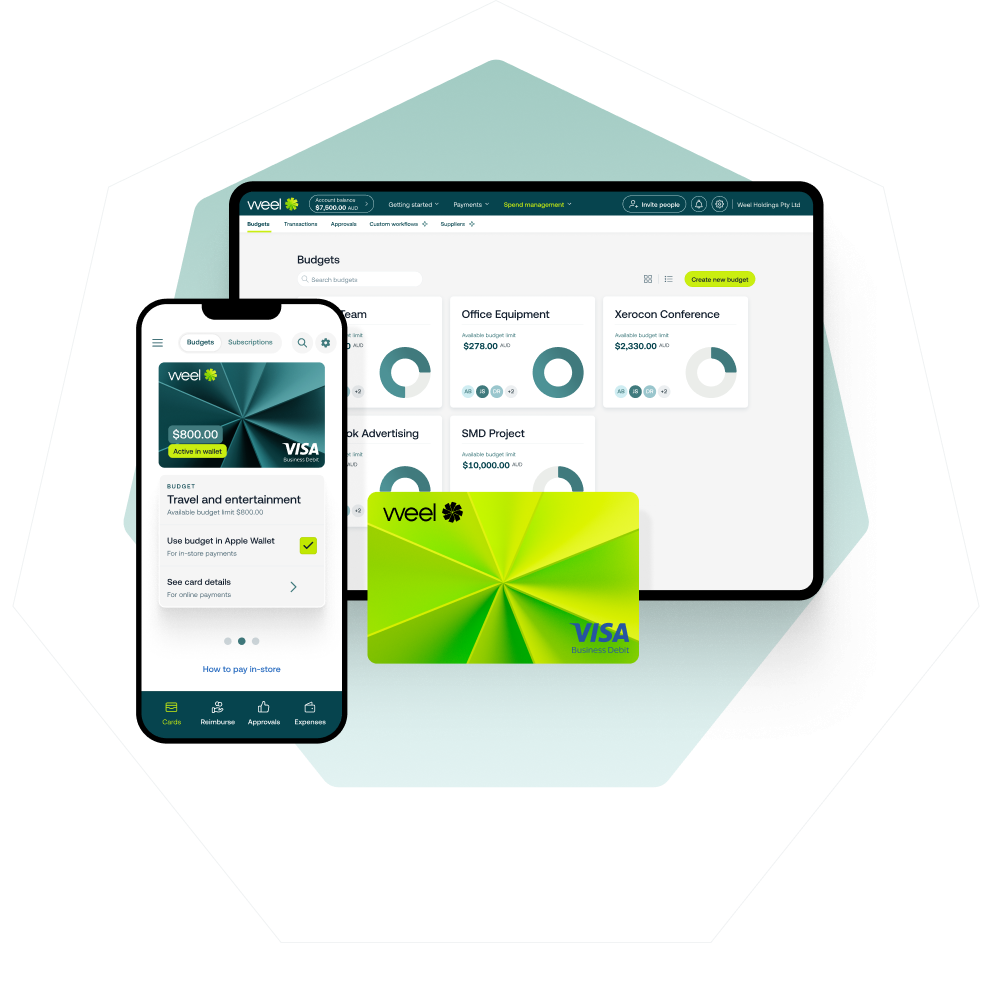
Most budget management software gives you a plan and a report. Weel gives your finance team a closed loop: from approved budget to direct budget controls on every card, through real-time expense tracking, to automatic reconciliation with Xero, MYOB, or NetSuite.
Here is what that closed loop looks like in practice.
Budget to card in real time
Weel corporate cards carry spend limits configured against your approved budget structure. When a department has a $10,000 monthly travel allocation, every card in that cost centre operates within that limit. Spend that would breach the limit routes to an approval workflow automatically. No manual monitoring required. No end-of-month surprise.
Approval workflows that enforce policy, not just record it
Businesses using Weel's approval workflows reach 95% expense completion across all transactions. That is a 7-point lift over businesses without configured workflows. Every approval decision is timestamped, attributed to the approver, and stored in an immutable audit log. When your auditor or the ATO asks for evidence of spend authorisation, the record is already complete.
Expense tracking that closes the gap between spend and accounting
The median time from card swipe to accounting sync on Weel is 2.3 days. That is not the end-of-month reconciliation sprint that most Australian finance teams run. It is a near-continuous flow of coded, approved, GST-mapped transactions into your accounting system. Expense management that runs at this pace means month-end is a verification step, not a rebuild.
50% of card expenses fully approved within 24 hours
Across 3.9 million transactions, half of all card spend on Weel completes the full workflow - receipt attached, coded, manager-verified - within one business day. The budget impact of that spend is visible to your finance team the same day it occurs.
Over 4,000 Australian and New Zealand businesses run their company spend on Weel. The common thread is not industry or size - it is that their finance teams stopped accepting the lag between budget and actuals as an inevitable feature of financial management.
If your budget management software gives you a plan but not control over what gets spent against it, the plan is decorative. Book a demo to see how Weel closes the loop from budget allocation to reconciled actuals - for every department, every transaction, every month.

.png)