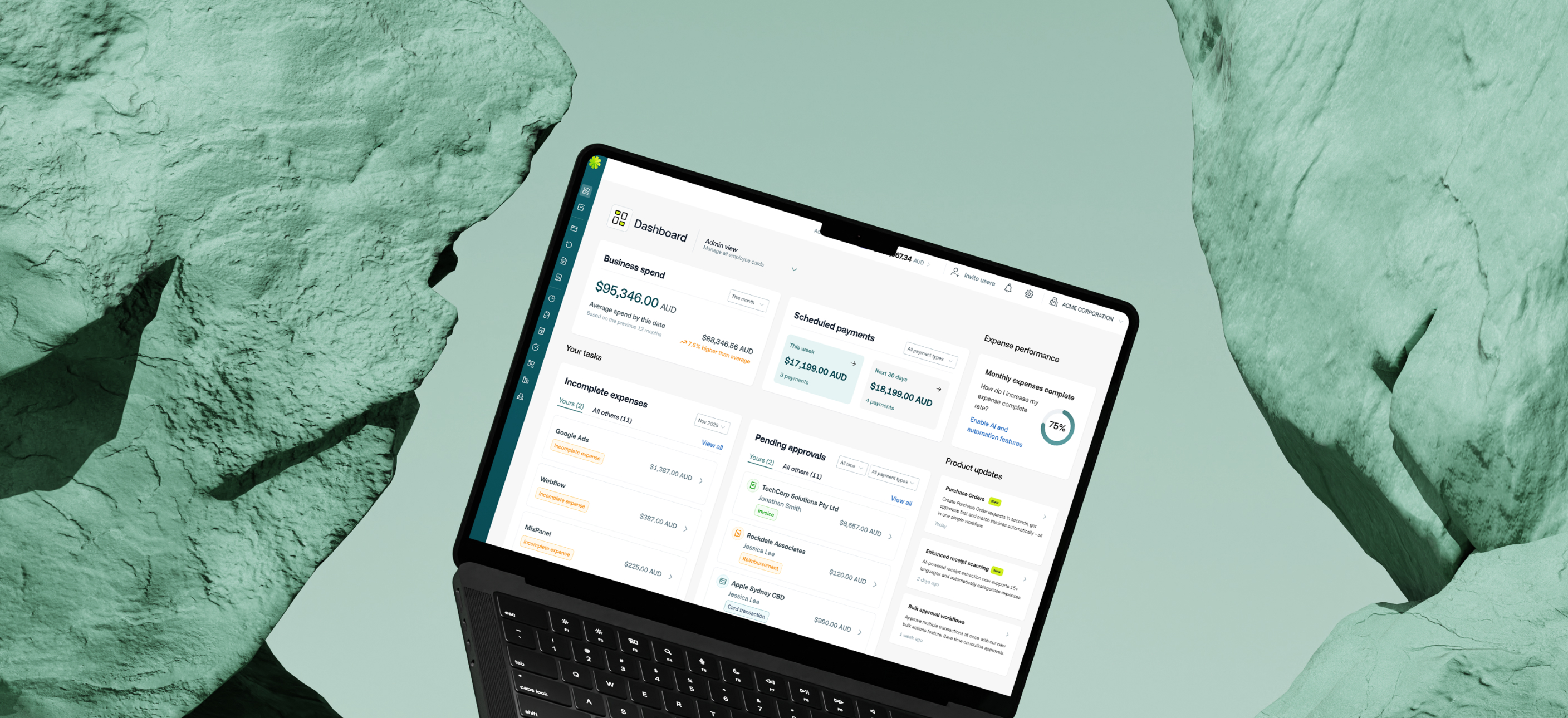

You now have a personalised Dashboard in Weel — a new role-aware home screen that gives every user instant visibility into what needs their attention — personalised to their role. Admins see business-wide spend metrics, upcoming payments, and team task management. Team members see their personal spend, shortcuts to cards, and outstanding expenses. Both views include a live product updates feed, and admins can toggle between views in a single click.
This is available to all customers on our Basic, Premium, and Enterprise plans.
- Finance admins and managers who want a single starting point for their day
- Team members who want a single view of what's outstanding for them and an easy way to clear their list
Jumping between screens to piece together your daily picture wastes time and lets things slip through the cracks. The Dashboard helps you:
- Get instant visibility into what needs your attention — without navigating across multiple areas of Weel
- Clear your to do list — from a single list, without breaking flow
- Keep on top of team tasks without losing track of your own — the "Yours / All others" tabs separate them clearly
- Know what payments are coming up — scheduled AP invoices and reimbursements are visible for this week and the next 30 days
- Stay on top of your team's expense completion — the Expense Performance KPI shows how the team is tracking at a glance
- Incomplete expenses and pending approvals — each with "Yours / All others" tabs
- Individual view for team members — personal spend, budget cards, and recent activity
- Product updates feed — the latest from the Weel team, right in your dashboard
- Business spend vs your 12-month historical average — filterable by period
- Scheduled payments widget showing upcoming AP invoices and reimbursements
- Monthly expense completion rate — track expense performance in your account and take action with AI and automations
The Dashboard is already live in your account — no setup required.
1. Log in to Weel
2. You'll immediately open to the Dashboard (this can also be found in the side navigation)
3. Admins will land on the Admin view by default — use the dropdown in the header to switch to Individual view
4. Team members will see their personalised Individual view automatically




©2017 - 2026 Weel Holdings Pty Ltd
All rights reserved