





What is an expense claim?

An expense claim is a request an employee submits to be paid back for a business cost they covered personally. A client lunch, a flight, a box of stationery. An approver signs off, then finance completes the employee reimbursement. The expense claim process usually has four stages: spend, submit, approve, reimburse.
How long that loop takes depends entirely on the tool behind it. A paper form or spreadsheet means someone chases receipts, manually checks GST coding, and waits for a signature before payment happens. Software built for expense claims collapses those stages. Receipts are captured at the point of spend. Approval routes automatically. The reimbursement process finishes in days, not whenever someone gets around to the paperwork.
For Australian businesses, whichever tool you use needs to handle GST correctly and keep proper records of business spending, per the Australian Taxation Office's GST requirements. That's a baseline, not a differentiator, every option below needs to clear it.
Tools and methods for expense claims and reimbursements
1. Weel
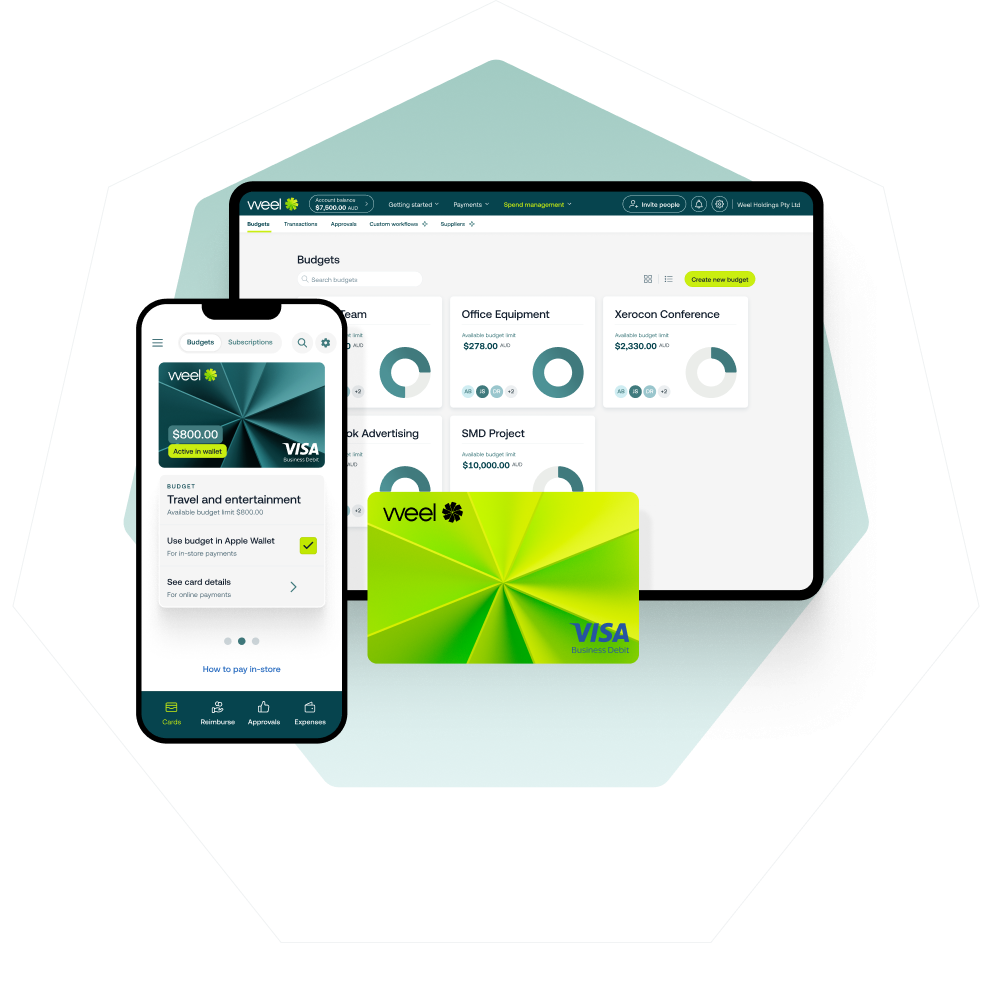
Weel replaces the expense claim entirely for most spend. Your team uses a corporate card with a pre-set budget, so there's no personal money to claim back in the first place. For the spend that still needs reimbursing, receipts are captured automatically. Weel's AI agents complete category, GST and description before an expense report ever needs manual attention.
Who it suits: Australian businesses that want most spend to skip the reimbursement process altogether, with a fast, automated claims path for what's left.
Limitations: Weel is a corporate card and expense platform first, so businesses wanting a pure reimbursement-only tool with no card component may find it does more than they're looking for.
2. Expensify
Expensify is one of the longest-running dedicated expense claim apps, built around photographing receipts, submitting claims and getting reimbursed, with a corporate card option added more recently.
Who it suits: businesses running a reimbursement-first model who want a dedicated claims app rather than a bundled feature.
Limitations: Australian GST and ATO record-keeping support is thinner than platforms built for the local market from the start, and its card product has limited presence here.
3. Xero (native expense claims)
Xero's own expense claims feature lets your team submit and approve claims inside the accounting platform you already use, without adding another login. It's a genuinely useful starting point for very small teams, and tools like Weel connect to Xero directly once claim volume outgrows it.
Who it suits: small businesses already on Xero who want basic claim submission and approval without a separate subscription.
Limitations: claims are reviewed after the spend has already happened, with manual receipt matching and no real-time card control.
4. Employment Hero
Employment Hero bundles expense claims into its broader HR and payroll platform, letting employees submit claims from the same app they already use for leave and payslips.
Who it suits: businesses that want expense claims as one feature inside an HR platform, rather than a dedicated finance tool.
Limitations: approval workflows and reporting depth are lighter than platforms built specifically around expense and card spend management.
5. Zoho Expense
Zoho Expense is a dedicated, lower-cost expense claim app that covers receipt capture, approval routing and reimbursement, aimed at businesses already using other Zoho products.
Who it suits: small teams wanting a straightforward, affordable claims app without a large feature set to configure.
Limitations: card issuing and real-time budget controls are limited compared to card-first platforms, so spend visibility still lags behind the claim itself.
6. MYOB expense claims
MYOB's expense features sit inside its accounting software, letting your team log receipts and claims without a separate platform.
Who it suits: very small businesses already on MYOB that want basic expense claim tracking bundled with their accounting subscription.
Limitations: as a feature inside accounting software rather than a dedicated platform, approval workflows and real-time visibility are more limited than purpose-built tools.
7. Paper forms and spreadsheets
The starting point for most businesses: an employee fills in a reimbursement form, attaches paper or emailed receipts, and a manager signs off before finance processes payment, often in the next pay run rather than immediately.
Who it suits: very small or new businesses with low expense volume and no budget yet for dedicated software.
Limitations: every stage is manual, receipts go missing, GST coding errors slip through, and reimbursement timing depends entirely on when someone gets to the paperwork.
Expense claims vs reimbursement forms: what's the difference
An expense claim is the overall request, "I spent money on the business, please pay me back". A reimbursement form is one specific way of submitting that request, a structured document capturing the amount, the reason and the receipt, whether that's a paper template or a field inside software.
Reimbursement itself is a broader term again, it can mean an expense claim payout, but also cover insurance payouts, travel refunds or other money paid back for a wide range of reasons. In a finance software context, what matters is this: a good reimbursement form makes the claim easy to submit correctly the first time, and a good expense claim tool turns that form into a paid reimbursement without a person chasing it through each stage by hand.
How to choose the right tool for expense claims and reimbursements

Start with how your team actually spends money, not which tool has the longest feature list.
- Does your team spend personal money first and claim it back, or does the business issue cards? Reimbursement-first tools suit the first model. Card-first platforms like Weel suit the second, and reduce how often a claim needs to happen at all.
- How many claims does your team submit each month? A handful a month might suit a simple form. Dozens across several people needs approval routing and reporting.
- What's your accounting software, and does the tool sync properly? Check Xero integration and MYOB integration specifically, not just "integrates with accounting software" as a general claim. GST coding and reconciliation status need to carry across automatically.
- Can your team submit claims from a phone? A proper mobile expense app is what actually stops receipts going missing. A policy asking people to keep better records on paper doesn't.
- How fast does reimbursement need to happen? If cash flow for your team matters, the gap between submitting a claim and getting paid is the number to compare, not just the feature list.
How Australian finance teams use Weel for expense claims
Most tools on this list manage the claim once it's already been submitted. Weel is built to reduce how often that submission needs to happen at all, and to close the loop fast when it does.
Across Weel platform data, half of all reimbursements are paid within 24 hours. 95% of reimbursements are fully paid. That's the complete path from submission to money landing in an account, not just the paperwork stage. For spend that goes through Weel's corporate cards instead of a personal claim, over 90% of card expenses reach full manager approval, with 50% approved within 24 hours.
If your team is comparing a reimbursement-first app against a platform that removes most reimbursements from the picture, that's the real decision this comparison comes down to. Weel is built for finance teams who want claims closed fast, and want fewer of them to begin with. Every Expense Complete.
Conclusion
Every tool on this list gets an expense claim from submission to payment eventually. The real difference is how much of that path still needs a person to chase, and how long your team waits to be paid back. If that gap is what you're trying to close, Weel closes it automatically for Australian businesses running real card and claim spend every day. Book a Weel demo and see your own claims move through the loop in real time.


.jpeg)