






Disclaimer: This article provides general information only and is not tax or financial advice. Tax obligations vary by business type and circumstance. We recommend consulting a registered tax agent or visiting ato.gov.au for guidance specific to your situation.
Choosing the right expense management software in Australia is a decision that shapes how your finance team operates for years. Get it right, and every receipt, approval, and reconciliation closes automatically. Get it wrong, and you're back to spreadsheets, email chains, and month-end panic.
This guide covers six criteria to check before you commit, with a focus on the one most buyers overlook: whether your corporate cards actually integrate with the platform you're evaluating. If you're still weighing up what expense management is and why it matters, start there. This article picks up where that foundation leaves off.
What is expense management software?
Expense management software is a platform that captures, codes, approves, and reconciles business expenses in one place. Instead of paper receipts, manual spreadsheets, and disconnected approval chains, an expense management system automates the full cycle from the moment money is spent to the moment it hits your accounting software.
For Australian businesses, the right expense software also needs to handle GST coding, ATO-compliant record keeping, and integration with local accounting platforms like Xero and MYOB. These aren't optional extras; they're baseline requirements.
This article won't rehash the basics. For a deeper look at how business expense management works end to end, the Weel guide to expense management covers the fundamentals. What follows is a buyer's checklist: six things to verify before you sign.
Before you evaluate: know what you're solving for

Every expense management application on the market will claim to save you time. With dozens of expense management solutions available in Australia, the sheer number of options makes the selection process feel overwhelming. But time savings aren't a selection criterion; they're an outcome of picking the right tool for your specific problems.
Before you open a single demo, write down your top three pain points. Common ones for Australian finance teams include:
- Receipts going missing between purchase and month-end close
- Manual data entry eating hours that should go to analysis
- No visibility into team spending until the credit card statement arrives
- Approval bottlenecks where managers don't know what's waiting for them
- Disconnected tools for cards, reimbursements, and accounting
Your pain points determine which of the following six criteria matter most. A business drowning in receipt chaos needs OCR and mobile capture above all else. A business with 50 people spending on corporate cards needs card integration and approval workflows first.
1: Corporate card integration
This is the criterion most buyers skip during evaluation, and it's the one that causes the most friction after go-live. If your team already uses corporate cards (or you're planning to issue them), the expense management software you choose must integrate directly with those cards.
What "integration" means in practice:
Transaction feed in real time
Every card swipe, tap, or online purchase should appear in the expense management system automatically, with no manual import or CSV upload.
Card-level controls built in
The platform should set spend limits, merchant restrictions, and category rules at the card level, not just at the expense report level.
Receipt matching at the point of spend
When someone taps their card, the platform should prompt them to capture the receipt immediately, not three weeks later at month-end.
Virtual and physical card issuance
Your expense manager software should issue both virtual cards (for online subscriptions and one-off purchases) and physical cards (for in-store and travel) from within the same platform.
Why this matters for Australian businesses: many organisations still treat corporate cards and expense management as separate systems. The card provider issues statements. The expense tool collects receipts. Someone in finance manually reconciles the two. That gap is where receipts go missing, approvals stall, and month-end close drags on.
The test question for any vendor demo: "If someone on my team taps their corporate card at a supplier, what happens next in your platform, automatically, with no manual steps?"
If the answer involves a CSV export, a separate portal, or "your team will need to log in and match the transaction," that's not integration. That's two disconnected systems wearing a trenchcoat.
2: Approval workflows
Expense approval workflows determine whether spending gets reviewed in hours or weeks. The right expense reporting software routes each transaction to the right approver based on rules you set: dollar thresholds, departments, project codes, or expense categories.
What to check:
- Multi-level approvals: Some purchases need one sign-off. Others (above a certain dollar amount or in specific categories) need two or three. Your platform should handle both without manual configuration every time.
- Delegation and escalation: When an approver is on leave, the system should route to a delegate automatically. No email chains asking "who's covering for Sarah?"
- Policy enforcement at submission. Out-of-policy expenses should be flagged before they reach an approver, not after. The expense management system should reject or flag non-compliant submissions at the point of entry.
- Mobile approvals: Managers approve faster when they can do it from their phone in 30 seconds. Check that the expense management app supports one-tap approval with full transaction detail visible.
The proof is in the numbers. Across Weel's platform, businesses using approval workflows reach 95% expense completion (based on 1.38 million transactions across 951 businesses). That's a 7-point lift over businesses without structured workflows. The difference isn't marginal; it's the gap between "mostly done" and "all done."
3: Receipt capture and OCR
Receipt capture is the foundation of employee expense management. If receipts don't get attached to transactions at the point of spend, everything downstream breaks: approvals stall, coding is guesswork, and your finance team spends month-end chasing paper.
What to check:
- Mobile receipt capture: Your team should be able to photograph a receipt on their phone immediately after a purchase. The business expense app should attach it to the correct transaction automatically.
- OCR (optical character recognition): The platform should extract merchant name, date, amount, and GST from the receipt image without anyone typing those details manually.
- Auto-matching: Receipts should match to card transactions automatically. If someone photographs a receipt from a $47.50 lunch at a cafe, and there's a $47.50 card transaction at the same merchant on the same day, the expense tracking software should link them without intervention.
- Storage and retrieval: The ATO requires businesses to keep records of all business expenses for five years. Your platform should store receipt images in a searchable, audit-ready format that meets ATO record-keeping obligations.
The standard to look for: receipts captured within hours of the transaction, not days. Across Weel's platform, the median receipt capture time is 4 hours, and 64% of receipts are captured within 24 hours of the transaction (based on 3.9 million cleared card transactions). That's what "captured at the point of spend" looks like at scale.
4: Accounting sync
Your expense management software isn't a standalone system. It's a data source for your accounting platform. If expenses don't flow automatically into Xero, MYOB, QuickBooks, or NetSuite, your finance team is doing double handling: managing expenses in one system, then manually re-entering or importing into another.
What to check:
- Direct integration, not file export: Look for a native two-way sync with your accounting software, not a CSV export that someone imports manually each week.
- GL code mapping: The platform should map expense categories to your general ledger codes automatically. When someone categorises a purchase as "office supplies," it should land in the correct GL account in your accounting software without manual re-coding.
- Real-time or near-real-time sync: The gap between a transaction happening and that transaction appearing in your accounting system should be hours, not weeks. Across Weel's platform, the median time from card swipe to accounting sync is 2.3 days (based on 2.5 million exported transactions).
- Tax code accuracy: For Australian businesses, every transaction needs the correct GST treatment applied before it reaches your accounting software. The platform should handle GST-inclusive, GST-free, and input-taxed transactions based on merchant category and expense type.
Integration with Xero, MYOB, and QuickBooks is table stakes for any business expense software serving the Australian market. Integration with NetSuite or other ERP systems matters for mid-market and larger businesses. If your team also files travel claims, confirm that the platform works as travel and expense management software in one system, rather than requiring a separate travel module. Verify the depth of the integration, not just the logo on the integrations page.
For a broader look at how expense management sits within your overall spend management software stack, Weel's category guide covers the full picture.
5: Australian compliance and GST handling
Any expense management software sold in Australia will mention GST somewhere on its website. The question is whether it actually handles GST correctly at the transaction level, or whether it treats compliance as an afterthought.
What to check:
- Automatic GST coding. The platform should apply the correct GST treatment (GST-inclusive, GST-free, or input-taxed) to each transaction based on the merchant category, expense type, and purchase amount.
- ATO-compliant record keeping. The ATO requires businesses to keep records that show the date of the transaction, the supplier's name, the amount, the nature of the goods or services, and the GST component. Your expense management system should capture and store all of this automatically.
- FBT tracking. If your business provides fringe benefits (entertainment, travel, or other non-cash perks), the platform should flag expenses that may attract FBT obligations. This isn't about the software giving you tax advice; it's about surfacing the right transactions for your accountant or tax adviser to review.
- Audit trail. Every expense, approval, edit, and export should be logged with timestamps, approver names, and change history. An audit-ready expense management system means your finance team isn't scrambling to reconstruct a trail when the auditor calls.
- BAS-ready reporting. Your platform should produce reports that map directly to Business Activity Statement categories, reducing the manual work required at each BAS lodgement period.
This criterion is where generic global expense management systems often fall short. A platform built for the US market may handle expense categories perfectly but treat GST as an optional tax field rather than an integrated part of every transaction record.
6: Real-time visibility and reporting
Expense tracking software that only shows you what happened last month isn't giving you visibility. It's giving you a rearview mirror.
What to check:
- Real-time dashboards. You should see what your team is spending right now, not what they spent 30 days ago. Real-time visibility means every transaction appears on your dashboard the moment it clears.
- Budget tracking by department, project, or cost centre. Your finance team should be able to set budgets at any level of the organisation and track actual spend against those budgets in real time.
- Custom reporting. Pre-built reports are a starting point, but your business has specific reporting needs. Check that the platform supports custom fields, filters, and export formats.
- Anomaly detection. The platform should flag unusual spending patterns: a sudden spike in a category, a transaction that's significantly larger than the team's average, or spending outside normal business hours.
Real-time reporting isn't just a feature for the CFO's dashboard. It's the difference between catching a problem this week and discovering it at month-end when it's too late to act.
Common mistakes when choosing expense management software

Even with clear criteria, buyers make predictable mistakes during the selection process. Here are the three most common:
Evaluating features in isolation
A platform might have excellent OCR but no card integration, or great approval workflows but a weak accounting sync. The criteria above work as a system. Weakness in one area creates bottlenecks in the others.
Choosing based on price alone
The cheapest expense management system is the one that creates the most manual work downstream. The true cost includes the hours your finance team spends on data entry, receipt chasing, and manual reconciliation that the platform should have automated.
Ignoring the implementation and onboarding experience
Ask every vendor: how long does implementation take? What does onboarding look like for my team? What support is available in Australian business hours? A platform that takes three months to deploy and requires a dedicated IT resource to maintain isn't saving anyone time in the first quarter.
How Australian finance teams use Weel for expense management
Weel closes the loop on every expense, from the moment a card is tapped to the moment the transaction is reconciled in your accounting software. No chasing. No manual matching. No month-end surprises.
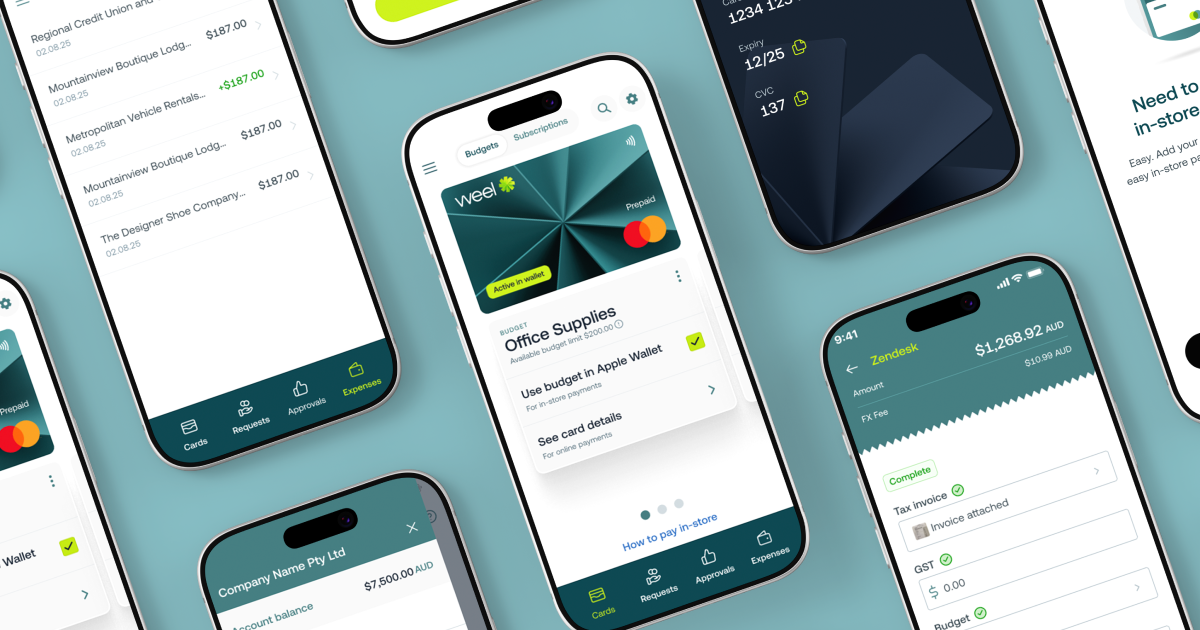
Here's what the full cycle looks like:
Card transaction happens
Weel issues both virtual and physical corporate cards with real-time spend controls built in. Every transaction appears in the platform instantly.
Receipt captured automatically
Your team photographs the receipt on their phone. Weel's OCR extracts the details and matches the receipt to the transaction.
Approval routed instantly
The transaction routes to the right approver based on your pre-set workflows. Across the platform, half of all card transactions are fully manager-approved within 24 hours (based on 3.9 million cleared transactions).
Accounting sync completed
Approved, coded transactions flow directly into Xero, MYOB, QuickBooks, or NetSuite. No CSV exports. No manual re-entry.
Books close on time
Over 90% of card expenses reach full manager approval across the platform (based on 3.9 million transactions). Month-end close is already done before month-end arrives.
Weel is used by 4,000+ Australian businesses. The expense management platform and reimbursement tools work together so every expense, whether it's a card transaction or an out-of-pocket claim, follows the same workflow: captured, coded, approved, synced, done.
"Every Expense Complete."
Conclusion
Choosing expense management software for your Australian business comes down to six criteria: corporate card integration, approval workflows, receipt capture, accounting sync, GST compliance, and real-time visibility. Check each one during your evaluation, and you'll avoid the most common buyer mistakes.
The right platform doesn't just automate expense reports. It closes every loop, from swipe to reconciliation, without your finance team touching a spreadsheet.
Book a demo to see how Weel handles all six criteria in one platform.