





Disclaimer: This article provides general information only and is not tax or financial advice. Tax obligations vary by business type and circumstance. We recommend consulting a registered tax agent or visiting ato.gov.au for guidance specific to your situation.
Submitting expenses from your desk at month-end is already a pain. Doing it from a hotel room in Brisbane, a client site in Auckland, or a tradie's van at 7am is a different problem entirely when your expense management app is not built for mobile. The right app turns a phone into a complete expense management tool: receipt captured, coding done, approval sent, all before you board the next flight.
For finance managers and office managers evaluating options, the feature gap between a good expense management app and a basic spending tracker is significant. This guide covers what to look for, what drives actual team adoption, and how to avoid the most common mistake: buying a desktop product wrapped in a mobile shell.
What is an expense management app?

An expense management app is a mobile application, available on iOS and Android, that lets your team record, submit, and manage business expenses from a smartphone or tablet. It replaces paper receipts, spreadsheets, and the end-of-month email chase with a workflow your team completes on the day of spend.
Modern expense management apps sit on top of a broader expense management platform. The app is what your team interacts with day-to-day: capturing receipts, submitting claims, and checking approval status. The platform handles the back-end: policy rules, accounting sync, and reconciliation.
The category overlaps with expense tracking software, expense manager tools, and general business expense management platforms. An expense management app, specifically, means a mobile-first product built for the moment of spend. Not a reporting dashboard you visit at month-end. Not a desktop application to track expenses with a companion app bolted on. A tool designed around how your team actually spends money.
How a mobile expense app differs from desktop software
Desktop expense management software gives finance teams visibility and control from a computer. Valuable, but it does not solve the moment the expense happens, when someone is standing at a cafe counter, a hardware store, or waiting to board a flight.
A mobile expense management app closes that gap. The key differences:
- Capture at the point of spend. The app lets your team photograph receipts the moment they pay, before the receipt fades, gets left on a counter, or ends up at the bottom of a bag.
- Approvals from anywhere. Managers approve expenses from their phone, not from a desk. When your approval process requires desktop access, expenses stack up every time someone is out of the office.
- Real-time visibility for the business. When spending happens via a corporate card linked to a mobile app, transactions appear instantly. Not at month-end when the card statement arrives.
- Adoption that actually sticks. Your team submits expenses from the same device they already use. No logging into a separate portal, no batch uploads, no end-of-week memory test.
Key features to look for in an expense management app

Not every expenses app delivers on the promise. These are the features that determine whether your team uses it and whether month-end gets easier.
Mobile receipt capture and OCR scanning
The core function. When someone pays for a business expense, they open the app, photograph the receipt, and the app extracts the amount, date, and merchant automatically using optical character recognition (OCR). No manual data entry.
For Australian businesses, look specifically for: OCR accuracy on local receipts including GST line items, speed of extraction, and whether the app stores a digital copy that satisfies the ATO's record-keeping requirements. A receipt kept digitally in a compliant app meets ATO obligations. Paper copies are not required if the digital image is complete and legible.
Real-time card notifications
Every time a corporate card is used, the app notifies the cardholder immediately. That prompt is what drives same-day receipt capture. Without it, your team relies on memory, which is why receipts go missing.
Weel platform data across 3.9 million transactions shows a median receipt capture time of 4 hours. That speed only happens when the card notification triggers immediate action at the point of spend.
Mobile approval workflows for managers
Finance managers should not need to be at their desk to approve expenses. A good expense management app routes approvals directly to the manager's phone. They see the expense, the receipt, and the coding, and approve or query with one tap.
Businesses using structured approval workflows reach 95% expense completion, compared to 88% for those without (Weel platform data, 1.38 million transactions). Mobile-accessible approvals are what make those workflows actually close, because the approver is never blocked by a desktop requirement.
On-the-go expense submission for travelling teams
For your team members who travel, an expense management app means they submit claims as they go, not in a batch when they return. No lost receipts, no end-of-trip guesswork, and reimbursements that clear faster because the submission is complete before they land home. For teams working in areas with limited mobile signal, check whether the app supports offline expense capture before committing.
GST compliance and ATO-ready record keeping
This is where Australian businesses need more than a generic global expenses app. Every receipt captured needs to preserve the GST amount for BAS reporting. The app should tag GST automatically, not leave that coding to your team member to get right while rushing between meetings.
ATO rules for digital records are specific: the image must be a true and clear copy of the original document. An expense manager app that stores low-resolution or cropped images creates compliance risk at tax time. Look for full-document image capture with retention in line with ATO requirements.
Accounting software integration
A standalone expense tracker app is only as good as what happens after submission. Look for direct integration with your accounting software, whether that is Xero, MYOB, or NetSuite, so approved expenses sync automatically without manual re-entry. That sync eliminates the month-end data entry backlog and shortens your close.
Common pain points an expense management app solves
The problems finance managers and office managers report most often are not software problems. They are behaviour problems: receipts go missing, expenses get submitted late, managers are unavailable to approve, the system goes unused.
A mobile expense management app addresses each at the source:
- Missing receipts: captured at the point of spend, stored digitally, compliant with ATO requirements
- Late submissions: real-time card notifications prompt immediate action; the phone is always with your team
- Delayed approvals: approval workflows reach the manager's phone, not their desktop inbox
- System non-adoption: the app is on the device your team already uses; the friction is gone, so completion follows
How Weel's app keeps expense management moving
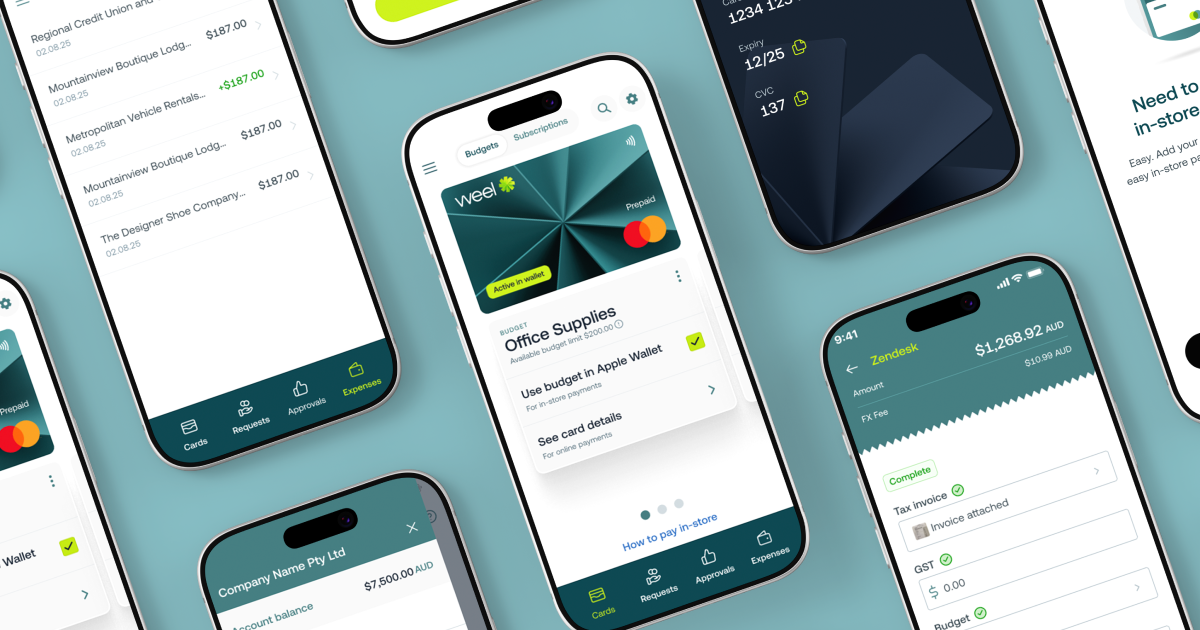
Weel's expense management platform is built around the moment of spend. When someone uses a Weel corporate card, they receive an instant notification and the app guides them through attaching the receipt and completing the coding on the spot.
Over 90% of card expenses reach full manager approval on Weel, across 3.9 million transactions in Australia and New Zealand. Half of those expenses are fully manager-approved within 24 hours. That completion rate does not happen because finance teams chase people harder. It happens because the mobile app removes every reason not to complete the expense on the day.
Approval workflows in Weel route each expense to the right approver automatically. Managers see the full expense, including the receipt image, GST coding, amount, and merchant, and approve from their phone. When Weel AI is active, expenses are 13% more likely to be fully approved within a week compared to expenses without AI assistance (Weel platform data, 257K AI-assisted transactions). "Expense Pain, Gone."
For finance managers who need a full picture from their desk, the same data is visible in the Weel dashboard: reconciled, coded, and ready to sync to Xero, MYOB, or NetSuite. The app and the platform work as one.
Conclusion
The right expense management app is not the one with the most features. It is the one your team actually uses, on the day of spend, without friction. For Australian businesses, that means mobile receipt capture that preserves GST data, real-time notifications that drive same-day submission, and approval workflows that reach managers wherever they are. Take the product tour to see how Weel handles expenses from first tap to final approval.